

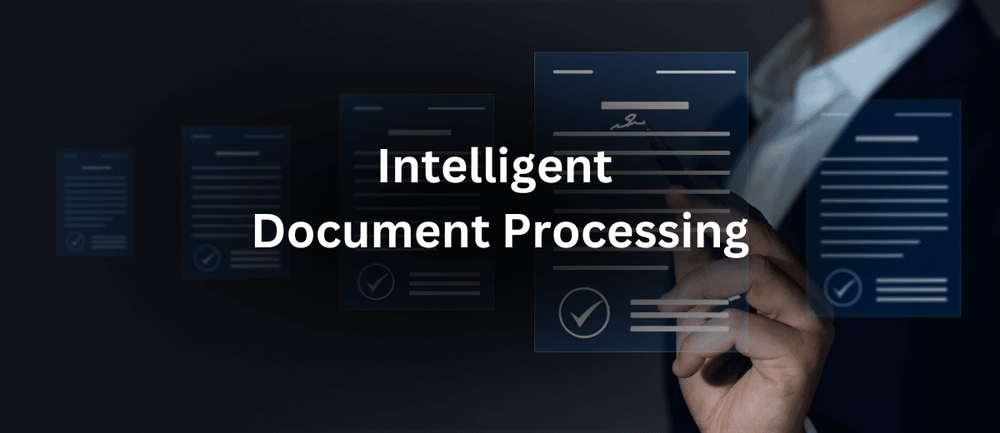
B2B businesses run on documents.
Invoices, purchase orders, contracts, delivery notes, tax forms, supplier records, customer applications, shipping documents, and product specifications move between teams every day.
For many organizations, these documents are still handled through a combination of email, spreadsheets, shared folders, manual data entry, and business software.
That creates a familiar problem.
Employees spend hours opening documents, finding relevant information, copying data into other systems, checking details, correcting errors, and sending files to the right people.
As document volumes increase, so does the operational workload.
This is one reason Intelligent Document Processing (IDP) is becoming increasingly important in B2B operations.
Intelligent Document Processing uses technologies such as artificial intelligence, machine learning, optical character recognition, and natural language processing to extract information from documents and help businesses process it automatically.
Unlike basic document scanning, IDP is designed to understand the information inside a document, not simply turn an image into text.
For B2B organizations dealing with large volumes of structured and unstructured documents, this can create opportunities to reduce manual work, improve data accuracy, speed up processes, and give employees more time to focus on higher-value activities.
What Is Intelligent Document Processing?
Intelligent Document Processing is a technology approach that helps businesses capture, understand, extract, validate, and route information from documents.
A traditional document scanning system might recognize text from an invoice.
An IDP system can go further.
It may identify:
- The supplier
- Invoice number
- Invoice date
- Purchase order number
- Tax amount
- Total amount
- Line items
- Payment terms
- Currency
It can then send the extracted information to the appropriate business system.
For example:
Invoice received → Information extracted → Data validated → Purchase order matched → Exception identified or approved → Accounting system updated
This reduces the amount of manual data entry required.
The technology can work with many types of documents, including PDFs, scanned documents, forms, emails, images, and other digital files.
Why Document Processing Is a B2B Problem
Documents are deeply connected to B2B operations.
A single business transaction can involve multiple documents.
Consider a purchase between a manufacturer and a supplier.
The process could involve:
- Purchase requisition
- Purchase order
- Supplier confirmation
- Delivery note
- Goods receipt
- Invoice
- Payment record
Each document contains information that may need to be entered into or checked against another system.
If employees have to manually process every document, the workload can become significant.
The problem becomes even larger when the company works with thousands of suppliers or customers.
Different organizations may also use different document formats.
One supplier may send a clean digital PDF.
Another may send a scanned document.
Another may use a spreadsheet.
Another may put important information in an email.
This variation makes traditional automation difficult.
IDP is designed to handle more of that variation.
Intelligent Document Processing vs. Traditional OCR
It is useful to understand the difference between IDP and Optical Character Recognition (OCR).
OCR converts text in an image or scanned document into machine-readable text.
For example, OCR can recognize:
Invoice Number: INV-48392
But recognizing text is not the same as understanding the document.
IDP adds additional capabilities.
It can determine that:
INV-48392
is the invoice number.
It can identify the supplier.
It can recognize the total amount.
It can identify the purchase order reference.
It can understand the relationships between different pieces of information.
In simple terms:
OCR reads the document.
IDP helps understand and process the document.
This distinction is important for B2B automation because businesses usually need structured information, not just extracted text.
How Intelligent Document Processing Works
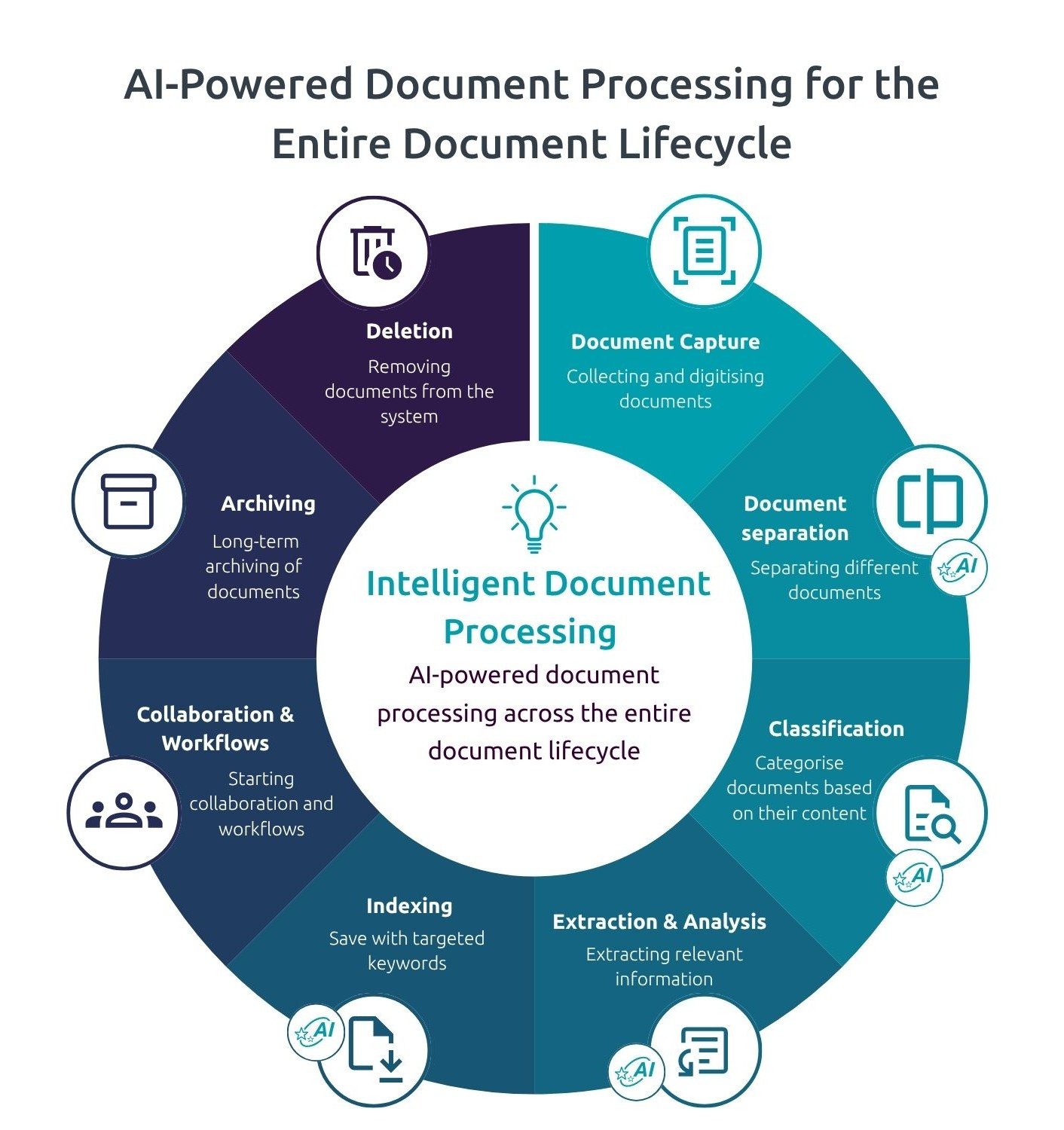
The exact technology varies between solutions, but an IDP workflow generally includes several stages.
1. Document Capture
The system receives a document.
It could come from:
- Upload
- Scanner
- Customer portal
- Supplier portal
- Cloud storage
- Business application
2. Document Classification
The system determines what type of document it is.
For example:
- Invoice
- Purchase order
- Contract
- Delivery note
- Tax document
- Application form
This helps determine what information should be extracted.
3. Data Extraction
The system identifies relevant information within the document.
For an invoice, that might include:
- Supplier name
- Invoice number
- Date
- Currency
- Tax
- Total
- Purchase order number
- Line items
4. Data Validation
The extracted information can be checked against business rules or other systems.
For example:
Does the supplier exist?
Does the purchase order number exist?
Does the invoice amount match the purchase order?
Are required fields present?
5. Exception Handling
Not every document can be processed automatically.
If the system is uncertain or finds a mismatch, it can send the document to an employee for review.
This is important.
The goal is not necessarily to remove people from every document process.
The goal is to allow technology to handle routine work while employees focus on cases that require judgment.
6. Data Delivery
Once the information is validated, it can be sent to another business system.
For example:
Invoice → IDP → Validation → ERP
This creates a connection between incoming documents and operational processes.
Where B2B Companies Are Using IDP
Intelligent Document Processing can support many business functions.
Accounts Payable
Accounts payable is one of the most common applications.
Businesses receive large numbers of supplier invoices.
Employees may have to:
- Open invoices
- Check supplier information
- Enter invoice data
- Match purchase orders
- Check tax details
- Identify duplicates
- Route invoices for approval
- Update accounting systems
IDP can automate many of these repetitive activities.
This can help reduce processing time and improve consistency.
Accounts Receivable
IDP can also support accounts receivable.
For example, businesses may process:
- Payment confirmations
- Remittance advice
- Customer correspondence
- Credit documents
Extracting information from these documents can help finance teams match payments with customer accounts more efficiently.
Procurement
Procurement teams work with purchase requests, purchase orders, supplier forms, contracts, and other documents.
IDP can help capture supplier information and connect documents to procurement workflows.
Customer Onboarding
B2B customer onboarding often requires documents such as:
- Registration forms
- Tax documents
- Business certificates
- Banking information
- Contracts
- Compliance documents
Manual review can slow down onboarding.
IDP can help collect and organize information from these documents so employees can focus on verification and exceptions.
Logistics and Supply Chain
Supply chain operations generate significant document volumes.
Examples include:
- Bills of lading
- Delivery notes
- Shipping documents
- Customs forms
- Packing lists
- Proof of delivery
IDP can extract key information and make it available to logistics systems.
This can reduce manual data entry and improve visibility.
Contract Management
Contracts contain important information that can be difficult to locate manually.
IDP can help identify items such as:
- Contract dates
- Renewal dates
- Payment terms
- Parties
- Service requirements
- Notice periods
This can make contract information easier to manage.
The Business Benefits of Intelligent Document Processing
The value of IDP goes beyond reducing data entry.
Faster Processing
Manual document processing can create queues.
For example, an invoice may sit in an employee’s inbox before someone has time to enter it into the accounting system.
Automated processing can reduce these delays.
Faster processing can help improve:
- Invoice turnaround
- Customer onboarding
- Supplier management
- Order processing
- Claims processing
- Contract administration
Fewer Data Entry Errors
Manual typing creates opportunities for mistakes.
A wrong invoice number or amount can cause downstream problems.
IDP can extract information consistently and reduce the amount of repetitive typing.
Human review can still be used where accuracy is especially important.
Lower Administrative Workload
Employees often spend substantial time on repetitive document tasks.
IDP can take over many routine activities.
This allows employees to spend more time on:
- Problem solving
- Customer communication
- Supplier management
- Financial analysis
- Process improvement
- Decision-making
Better Visibility
Documents often contain useful business information that remains trapped in files.
Once information is extracted into structured systems, businesses can analyze it more easily.
For example, invoice data can help businesses understand:
- Supplier spending
- Payment patterns
- Processing times
- Invoice exceptions
- Purchase order mismatches
The document becomes usable business data.
IDP Can Help Uncover Hidden Process Problems
Document automation can reveal more than document-related inefficiency.
It can expose broader process problems.
Suppose a company automates invoice processing and discovers that 30% of invoices cannot be matched with purchase orders.
The problem may not be the invoices.
It may indicate issues with:
- Purchase order creation
- Supplier communication
- Purchasing policies
- Data quality
- Goods receipt processes
This is an important point.
Automation can expose weaknesses that were previously hidden by manual work.
Instead of employees quietly fixing problems, the organization can see where those problems occur.
Handling Structured and Unstructured Documents
B2B organizations deal with both structured and unstructured information.
A structured form has predictable fields.
For example:
Customer Name
Customer Number
Address
Tax ID
A contract or supplier letter is less predictable.
Important information may appear in different locations or be written in different ways.
This is where modern IDP systems can be useful.
They can use language understanding and document analysis to identify information based on context rather than relying only on fixed positions.
That makes the technology more adaptable to real-world business documents.
The Role of AI in Intelligent Document Processing
AI is a major reason IDP has become more capable.
Older document automation systems often depended on fixed rules.
For example:
“If text appears in this location, treat it as the invoice number.”
That approach can work when every document looks the same.
But B2B documents vary significantly.
AI-based systems can identify patterns and relationships across different layouts.
Modern systems may use machine learning and language models to understand documents more flexibly.
For example, an invoice might label the total as:
- Total
- Amount Due
- Balance Due
- Invoice Total
- Grand Total
An intelligent system can recognize that these labels can refer to the same business concept.
This reduces the need to create a separate rule for every document format.
Human Review Still Matters
One common misconception is that intelligent document processing should eliminate human involvement.
That is not necessarily the right goal.
Some documents are straightforward.
Others are unusual, incomplete, or ambiguous.
For example, a system may not be confident about whether a handwritten number is “8” or “3.”
Instead of guessing, the system can flag the document for human review.
This creates a human-in-the-loop process.
The technology handles routine documents.
People handle exceptions.
Over time, the organization can analyze those exceptions and improve the process.
This approach can provide a better balance between automation and control.
IDP and Business Process Automation
IDP becomes even more powerful when it is connected to business workflows.
Imagine a supplier invoice arriving by email.
Instead of:
Email → Employee → Manual Entry → Approval → ERP
the process could become:
Email → IDP → Data Validation → Purchase Order Match → Approval → ERP
The document becomes the starting point for an automated business process.
This can reduce manual handoffs.
The same concept can be applied to customer onboarding, procurement, logistics, insurance claims, and other document-heavy workflows.
Improving the B2B Customer Experience
Document processing may seem like an internal activity.
But it can affect customers directly.
Consider customer onboarding.
If a new customer submits several documents and employees take five days to manually review them, the customer waits five days before becoming fully active.
If the organization can process standard documents faster, onboarding may become quicker.
The same applies to:
- Order processing
- Credit applications
- Returns
- Claims
- Contract approvals
- Account changes
Customers may never see the IDP technology.
But they can feel its impact through faster service.
Data Quality Is Critical
IDP is not magic.
The quality of the extracted information matters.
Businesses should establish clear validation rules.
For example:
- Is the supplier valid?
- Is the invoice number unique?
- Does the purchase order exist?
- Does the total match?
- Are required fields complete?
- Is the tax information valid?
The better the validation process, the more confidently extracted data can move into business systems.
Data quality should be treated as part of the overall automation strategy.
Security and Privacy Considerations
B2B documents can contain sensitive information.
Examples include:
- Financial details
- Customer information
- Supplier information
- Contracts
- Employee information
- Tax records
- Banking information
Organizations should carefully evaluate how documents are stored, processed, transmitted, and accessed.
Important considerations include:
- Access controls
- Data encryption
- Audit trails
- Retention policies
- Vendor security
- Data location
- Regulatory requirements
Before deploying IDP, businesses should understand what information is being processed and which systems or providers have access to it.
How to Start an IDP Project
Businesses do not need to automate every document process at once.
A focused approach is usually more practical.
Step 1: Identify a High-Volume Process
Look for a process involving large amounts of repetitive document work.
Invoices are often a good starting point.
Other possibilities include customer onboarding forms or shipping documents.
Step 2: Measure the Current Process
Record:
- Document volume
- Processing time
- Error rates
- Manual effort
- Exception rates
- Cost per document
- Average turnaround time
These measurements provide a baseline.
Step 3: Examine Document Variety
Understand how many different document formats exist.
Ask:
- How consistent are the layouts?
- Are documents digital or scanned?
- Are multiple languages involved?
- Are handwritten fields common?
- Are tables important?
This helps determine the appropriate technology approach.
Step 4: Define Validation Rules
Determine what information needs to be checked before it enters business systems.
Step 5: Connect the Workflow
IDP should not operate as an isolated tool.
Connect it to relevant business systems where practical.
Step 6: Start With a Controlled Pilot
Use a limited document category or supplier group.
Measure results.
Identify exceptions.
Improve the workflow.
Then expand.
Common IDP Implementation Mistakes
Automating a Broken Process
Automation cannot fix a fundamentally poor process by itself.
Review the workflow before automating it.
Ignoring Exceptions
A process that handles 90% of documents automatically may still create significant manual work if the remaining 10% are difficult.
Understand exception patterns.
Focusing Only on Extraction
Extracting data is only one part of the process.
Businesses also need validation, routing, approval, storage, and integration.
Poor Data Governance
Extracted information needs clear ownership and quality standards.
Trying to Automate Everything
Not every document requires automation.
Focus on processes where automation creates measurable value.
Measuring IDP Success
Businesses should define success before implementation.
Useful metrics include:
Processing Time
How long does it take to process a document?
Automation Rate
What percentage of documents can be processed without manual intervention?
Exception Rate
How many documents require human review?
Accuracy
How often is extracted information correct?
Cost Per Document
How much does it cost to process each document?
Employee Time
How many hours are saved?
Turnaround Time
How quickly can the business complete the related process?
These metrics help determine whether IDP is producing meaningful operational improvements.
The Future of Intelligent Document Processing
The future of IDP is likely to involve deeper integration with business processes.
Document processing will increasingly move from:
Read → Extract
toward:
Understand → Validate → Decide → Act
For example, an intelligent system may receive a supplier invoice, identify the relevant information, compare it with purchase and receiving records, recognize an exception, route it to the appropriate person, and update the financial system after approval.
The document is no longer simply a file.
It becomes an entry point into an automated business process.
AI can also make document systems more capable of working with complex information.
Instead of extracting only fixed fields, systems can potentially summarize documents, identify important clauses, compare information across documents, and highlight unusual situations.
This could be particularly valuable for contracts, procurement documents, compliance records, and customer communications.
IDP and the Broader Move Toward Intelligent Operations
Intelligent Document Processing is part of a larger change in B2B operations.
Businesses are moving from manual, document-heavy workflows toward processes where data can move automatically between systems.
This connects IDP with technologies such as:
- Workflow automation
- Process mining
- Artificial intelligence
- Robotic process automation
- Business process management
- Enterprise software
- Data analytics
The goal is not simply to automate individual tasks.
It is to create smoother business processes.
For example, process mining can identify where invoice processing slows down.
IDP can automate information extraction.
Workflow automation can route exceptions.
Analytics can measure the outcome.
Together, these technologies can provide a more complete approach to operational improvement.
Why IDP Is Particularly Valuable for B2B Businesses
B2B organizations often have a combination of high document volumes and complex processes.
They may work with:
- Hundreds or thousands of suppliers
- Large customer accounts
- Multiple product categories
- Different regulatory requirements
- Multiple countries
- Complex pricing
- Long approval processes
Documents are often at the center of these activities.
That makes document processing an important area for operational improvement.
The opportunity is not just to save employees from repetitive data entry.
It is to make information available faster and more accurately across the business.
Conclusion
Intelligent Document Processing is changing how B2B companies handle one of their most common operational challenges: working with large volumes of business documents.
Instead of treating invoices, purchase orders, contracts, forms, and shipping documents as files that employees must manually read and enter, businesses can use AI-powered technology to extract information, validate it, and connect it to operational workflows.
The biggest opportunity is not simply faster document reading.
It is turning document-based work into data-driven business processes.
For finance teams, this can mean faster invoice processing.
For procurement teams, it can mean less manual data entry.
For customer teams, it can mean quicker onboarding.
For logistics teams, it can mean better access to shipment information.
For business leaders, it can mean better visibility into where time and resources are being spent.
However, successful IDP requires more than choosing a technology platform. Businesses need clear processes, good data, appropriate validation rules, strong security controls, and a practical approach to human review.
The best place to start is with a high-volume, repetitive process where the current cost of manual document handling is easy to measure.
From there, companies can test automation, measure the results, learn from exceptions, and expand gradually.
As AI continues to improve how machines understand documents, the role of IDP in B2B operations is likely to grow.
The long-term opportunity is clear: turn documents from a source of manual work into a source of usable business information.




Leave a Reply